
What Is the Best Medical Practice Management Software?
Updated: October 2026
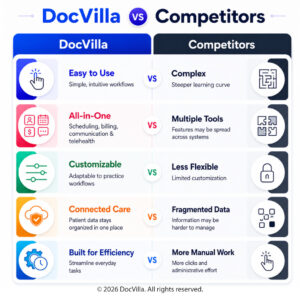
The best medical practice management software runs inside the EHR rather than next to it, so scheduling, eligibility checks, claims, patient payments, reminders, and reporting all read from the same patient record as the chart. DocVilla’s practice management software for medical practices does exactly that: patient scheduling with online booking and automated reminders, real-time insurance eligibility, integrated medical billing that creates the claim from the coded encounter, a free patient portal for intake, forms, and payments, inventory management, role-based staff access, and analytics and reports — one login for the front desk, the clinicians, and the billers, priced per provider. Independent practices use it as their medical office software and as the practice management system behind a cloud-based EHR, so the chart feeds the claim without re-entry. DocVilla is rated 4.9/5 across 178 verified reviews on Capterra, Software Advice, and GetApp; see current plans on the pricing page or see the front-desk-to-claim workflow in a live demo.
What the practice management suite includes
- Scheduling: provider calendars, custom appointment types and durations, online patient self-scheduling, and text, email, and phone reminders that cut no-shows.
- Eligibility and claims: real-time insurance eligibility at scheduling, claims generated from the encounter, claim scrubbing, electronic filing, ERA posting, and denial tracking — see EHR with integrated medical billing.
- Patient engagement: digital intake and consent forms, secure messaging, statements, and card-on-file payments through the portal, with automated cashless billing for copays and balances.
- Operations: inventory with expiration tracking, task management, role-based access for every staff role, referral management, eFax, and document management.
- Reporting: revenue, visits, no-shows, staff and provider productivity, and custom reports exportable to Excel.
Every component is configured for your specialty — primary care, pediatrics, mental health, weight loss, med spa and IV therapy, and more — and supported by US-based customer support and ongoing training.
Key Features of EHR Medical Practice Management Software
Scheduling
DocVilla offers scheduling calendar in all it's plans which can be integrated with your smart phone and google calendar so you are always on top of your appointments.
Inventory Management
Keep a track of your stock/inventory, revenue, expiration dates, manufacturer and a lot more. Tie that data with the patients. Create custom reports. Get automatic notifications.
Role Based Access
Create role based access for Providers, administrators, site administrators, location/department administrators, billers, inventory managers, nurses etc.
Analytics
Get holistic view by building custom reports across your practice. Get data for revenue, consults, patients. Extract, Transform and Export data to excel format.
Credit Card Processing
Charge your patients directly from DocVilla portal using their credit card/debit card. The money flows automatically to your bank account. We use Stripe as our payment gateway.
Secure Messaging
Exchange messages securely with patients and other staff members. Patients can message your from web and mobile patient apps. Get e-notifications on your portal.
Document Management
Securely upload documents such as x-rays, MRIs, blood reports, copy of insurance corresponding to encounters. Documents are stored safely in cloud using 256 bit encryption.
Free Patient Portal
DocVilla offers free patient portal. We can also customize and white-label the portal for a small fee. Patients can securely upload required documents and fill up quentionnaires.
Invoicing
Generate automatic paperless invoice based on encounters and charts. Apply copay, co-insurance and patient responsibility to the patient account. Generate reports based on the revenue.
Task Management
Assign tasks to your staff members with due dates, notes, corresponding patient and chart records. Get auto notifications and keep track of completion.
eFax
With electronic fax, you do not have to print or scan any documents. You can directly attach the documents which you receive from any other provider to the patient chart.
Referral Management
Manage referrals from other providers. Add referring providers to DocVilla along with their NPI. Auto populate this data when submitting claim. Seamless workflow from start till end.
Learn more about EHR Medical Practice Management Software
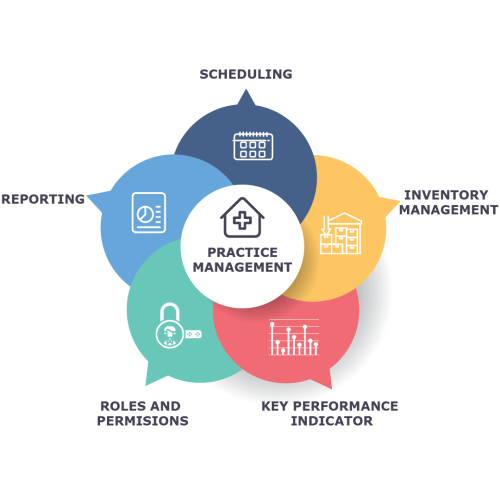
As part of Practice Management Suite, DocVilla offers Scheduling, Inventory Management, Key Performance Indicators for sales and staff members, Roles and Permissions for various employees and Custom Reporting.
Contact with us to understand how we can implement DocVilla for your medical practice. It’s one stop shop for all your needs at one low price.
DocVilla offers service-based scheduling and fees.
What does it mean? This feature allow the providers to add additional services besides telemedicine and in-person appointments. So, consider services such as Initial visit or follow up visit or Sutures and Wound care. Each service is different and requires a different time, effort and cost. DocVilla would allow the providers to add additional services with various rates and schedules. So using this model, a provider is not constrained to charging a flat fee from the patient and can provide quality care at different price points.

It’s true that every physician has primary responsibility of caring for their patients, but private practices have an additional challenge of running a business. Besides an EHR, DocVilla is also offers a medical practice management software which allows a practice to manage their day to day operations such as scheduling, billing and administrative tasks. DocVilla is fully cloud based which helps the doctors to access and manage their data from anywhere through mobile, tablet or desktop devices. Through DocVilla, the staff can book patient appointments, send email reminders to avoid (or reduce) no shows, organize patient data, verify patient insurance coverage, process medical claims, and generate reports of cancelled patient appointments. Schedule time with us for a demo.
How DocVilla EMR Practice Management Software help Medical Practices?
DocVilla Medical practice management software is a tool that helps medical practices manage their day-to-day operations and improve efficiency. It can help medical practices in several ways:
Streamlining administrative tasks: Medical practice management software can automate many administrative tasks, such as appointment scheduling, billing and coding, and insurance claims processing, which can save time and reduce errors.
Improved patient scheduling: Medical practice management software can help medical practices manage patient schedules more effectively. It can provide appointment reminders, confirmations, and waiting lists, which can help to reduce no-shows and increase patient satisfaction.
Improved financial management: Medical practice management software can help medical practices manage their financial performance by providing real-time data on revenue and expenses. It can also help with insurance claims and billing, which can help practices get paid faster and more accurately.
Improved patient care: Medical practice management software can help medical practices improve patient care by providing access to patient information in real-time, such as medications, lab results, and treatment history. This can help to improve the accuracy of diagnoses and reduce the risk of medication errors.
Better Data Management: Medical practice management software can also help with data management by providing a centralized platform for healthcare providers to store and share patient information, which can help to improve the accuracy of patient data and make it easier to track patient progress over time.
Compliance with regulations: Medical practice management software can help medical practices comply with regulations by providing automated reminders for compliance requirements such as HIPAA and providing an audit trail of the practice’s activities
In summary, Medical practice management software is a tool that helps medical practices automate administrative tasks, manage patient schedules and financial performance, improve patient care and data management, and comply with regulations. It can improve efficiency and productivity, while also providing real-time data to help practices make better-informed decisions.
A Top-Rated EHR for Medical Practices
DocVilla is rated 4.9 out of 5 from 178 reviews across Capterra, Software Advice, and GetApp — one of the highest-rated cloud-based EHR platforms for medical practices. With all essential features consolidated into one platform — EHR, practice management, eRx, patient portal, patient communication, customizable templates, medical billing, and document management — medical practices can streamline their workflows and eliminate copying and pasting patient data between different software systems. Read what practices say on our reviews and testimonials page, or schedule a free demo to see DocVilla configured for a medical practice.
DocVilla Pricing for Medical Practices
DocVilla is priced per provider, so medical practices pay for the providers they have — not for modules they don’t use. Plans come in four tiers — Bronze, Silver, Gold, and Platinum — and scale as your practice grows. See the DocVilla plans and pricing page for current details, or schedule a 1-hour demo to get exact pricing for your practice.
What to Test in Your DocVilla Demo as a Medical Practice
A DocVilla demo is a live online walkthrough with our team — you tell us what matters to your practice, and we run it on screen while you watch. In your 1-hour DocVilla demo, ask to see three things end to end. First, book a new patient online, watch the intake and consent forms arrive before the visit, and run the real-time eligibility check. Second, follow that visit from check-in through the coded encounter to the claim leaving the office, then see the ERA post back to the patient account. Third, open the reports a practice owner actually uses — revenue, no-shows, and provider productivity — and export one to Excel. The demo is configured for your specialty, so what you watch is your own workflow, not a generic reel.
Switching to DocVilla from Another EHR
Many practices come to DocVilla from other EHR systems. Our team manages the full transition — demographics, clinical notes, documents, and balances — with a migration plan and quote prepared after we review your data, since every practice’s records are different. See the EHR data migration guide for how the process works and what typically transfers, and the EHR data migration checklist for what to prepare. Evaluating your options? See all of our side-by-side comparisons on the DocVilla vs other EHRs page.
Frequently asked questions
What is the best medical practice management software for a medical practice?
The best medical practice management software is built into the EHR, so scheduling, eligibility, claims, patient payments, reminders, and reporting all work from the same patient record as the chart. DocVilla combines all of them in one cloud platform priced per provider, and is rated 4.9/5 from 178 reviews across Capterra, Software Advice, and GetApp.
Is DocVilla's practice management software separate from the EHR?
No. It is the same platform and the same login. The front desk schedules and checks eligibility, the clinician charts, and the biller files the claim from that coded encounter — nothing is exported between systems, and reports read from one database.
Can practice management software reduce no-shows and front-desk calls?
Yes. Online self-scheduling, automated text, email, and phone reminders, digital intake and consent forms before the visit, and a patient portal for messages, statements, and payments all shift routine work off the phone lines and cut missed appointments.
Can DocVilla migrate my data from my current EHR?
Yes. DocVilla’s team manages the full transition — demographics, clinical notes, documents, and balances. Because every practice’s records are different, we prepare a migration plan and quote after reviewing your data. See the EHR data migration guide for details.
How much does DocVilla cost for a medical practice?
DocVilla is priced per provider, with four plan tiers: Bronze, Silver, Gold, and Platinum. See the plans and pricing page for current details, or schedule a demo to get exact pricing for your practice.
Resources for EHR EMR Practice Management systems
Read articles about Electronic Health Records and Practice Management system that will help you to run your practice efficiently

AI Claim Scrubbing in DocVilla: Cleaner Claims Before They Leave the EHR
October 6, 2026
No Comments
Read More »

Patient AI Summary in DocVilla: AI-Generated Chart Summaries Before Every Visit
October 6, 2026
No Comments
Read More »

Denial Codes Explained: CO-45, CO-97, CO-16, and the Other CARC Codes Every Practice Sees (and How to Fix Each)
September 4, 2026
No Comments
Read More »

Provider Credentialing for a New Medical Practice: CAQH, PECOS, Timelines, and How Enrollment Differs
September 4, 2026
No Comments
Read More »